Case study
Designing a weekly quality audit, from scattered steps to a tool that can be checked
How I take a process that runs on spreadsheets and email, work out what it really needs, write its rules down, and build and test the screens. The example is TicketQA, a quality-audit tool I designed and built for this portfolio.
- My part
- Analysis, design, build and testing
- The example
- TicketQA, a demo on invented data
- Built with
- HTML, CSS and JavaScript, no framework
- Checked by
- Rule tests and scripted browser runs
TicketQA is a portfolio project. Its screens, scorecard, rules and data were all made for this site, for a bookshop that does not exist.
The kind of problem
Many customer support teams check the quality of their work the same way: every week someone picks a sample of closed tickets, reviewers score them against a checklist, and each agent is told how they did. When this runs on spreadsheets and hand-written emails, the same problems come back:
- Numbers drift. A score is typed or copied into several places, so the email, the weekly sheet and the report stop agreeing.
- Nobody can see where a result stands. Has the agent read it? Do they disagree? The answer is in someone's inbox.
- Loops stay open. A disagreement can go back and forth with no clear end, and a result can change after the agent has seen it.
How I analyse a process
- Follow one item from start to end. I trace a single ticket from the moment it is sampled to the moment it appears in a report, and write down every hand-off: who touches it, what they need, what they pass on.
- Give each person one question. The lead asks "what needs me today?", a reviewer asks "what is left for me?", an agent asks "how did I do, and can I disagree?". Each screen should answer its person's question first.
- Mark every copy. Wherever a number is retyped or pasted, two versions can disagree. Those are the places a system should replace with one record.
- Write the rules before the screens. I write each rule as one plain sentence: when a score counts, when results can be shared, who has the last word. Screens and tests are then built from the same sentences. TicketQA's rules are on its Scorecard page.
How I turn it into a design
One record, read everywhere
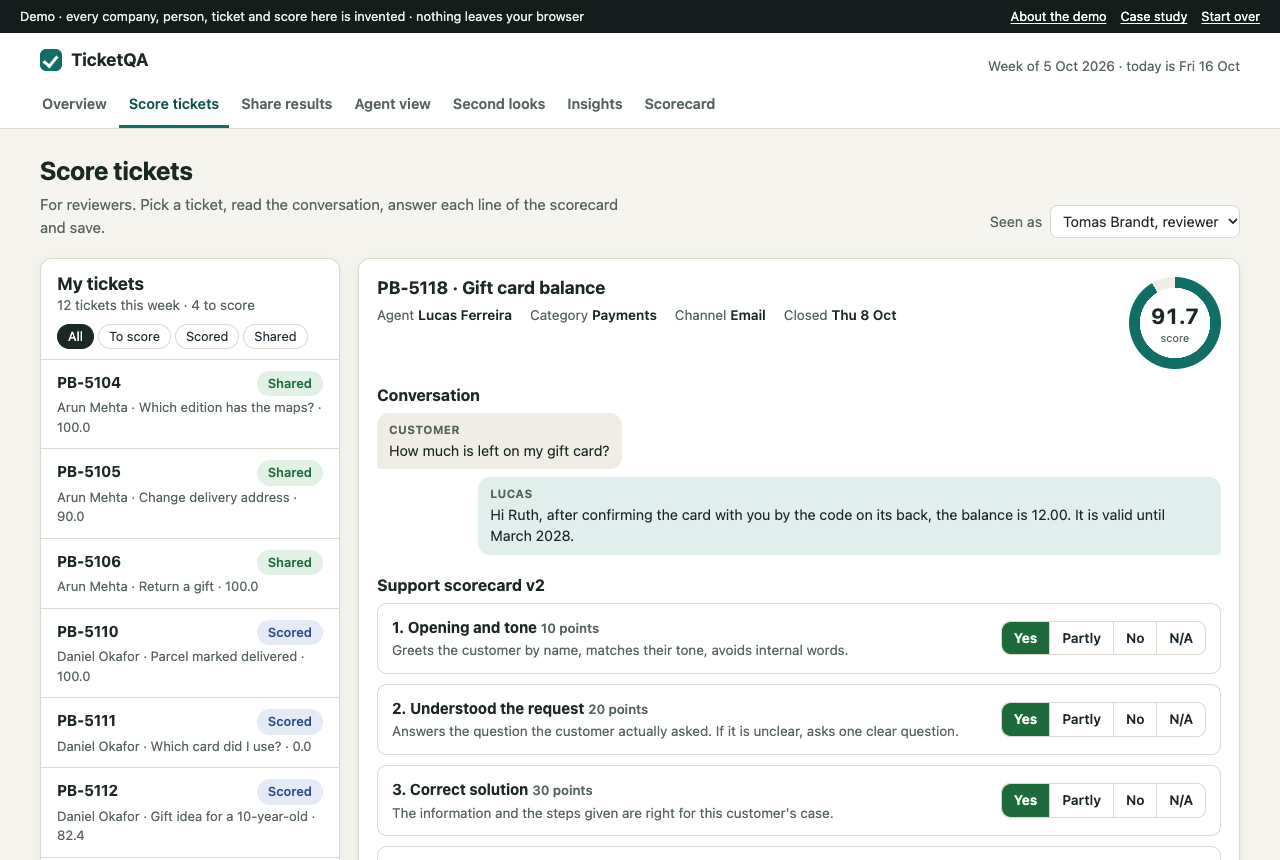
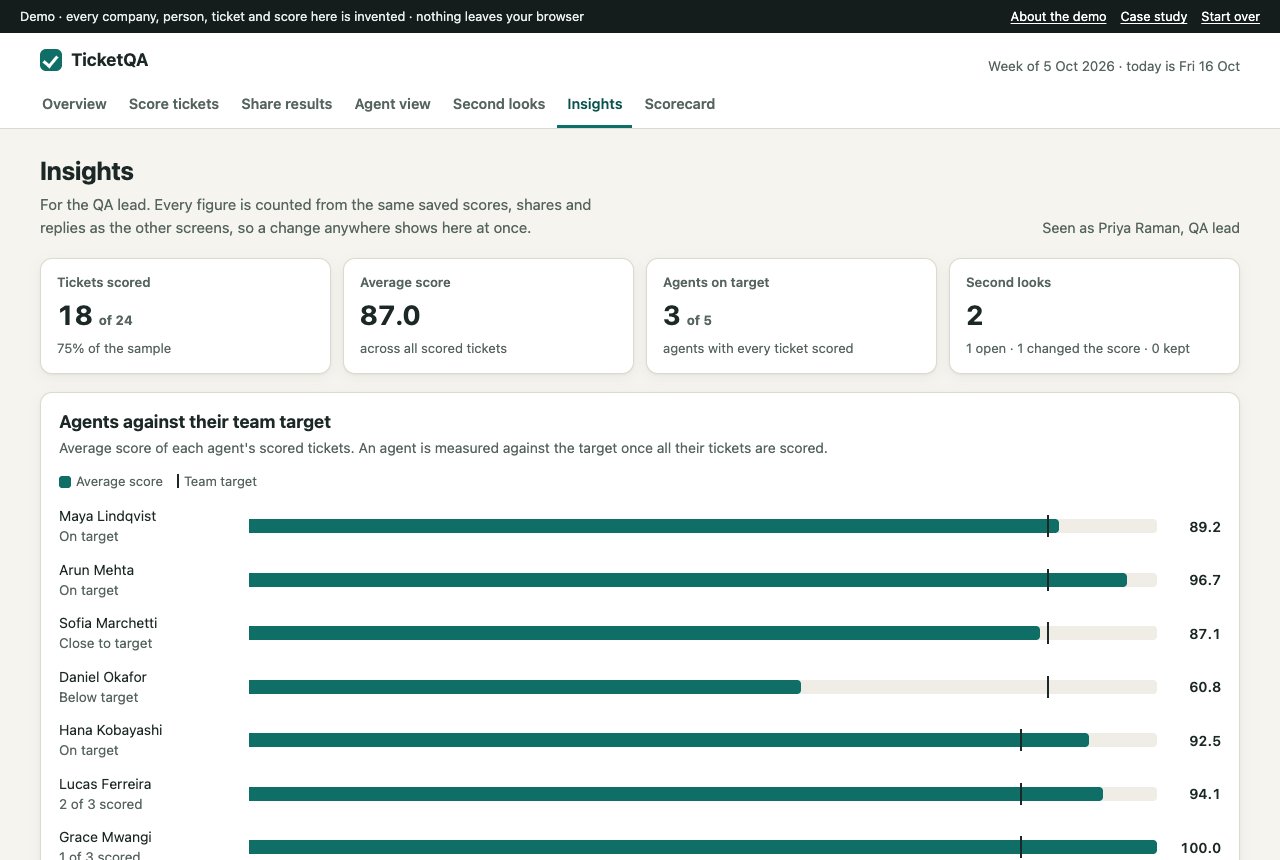
A ticket's score is saved once. The reviewer's screen, the agent's page, the lead's overview and the insights all read that same record, so they cannot disagree. In the demo, score a ticket and the overview and insights change at once.
Say where things stand, and what comes next
Each agent's results carry one status in plain words, from "Still being scored" to "Closed", and the lead's Overview turns those statuses into a short list of what needs doing: a reply that is overdue, a second look waiting, results ready to share.
Catch problems where the data is entered
A score cannot be saved until every line has an answer, every "No" has a comment, and an error tag says why points were lost. A critical line, the privacy check, sets the ticket to 0 if it fails. These checks keep the reports useful without anyone tidying up afterwards. Try them on Score tickets.
Close every loop
Results are shared once, when all of an agent's tickets are scored, and then lock: what the agent saw cannot change quietly. The agent sends one reply for the week, agreeing or asking for a second look on a line that lost points. The reviewer's answer to a second look is final. Every result ends as "Closed", and a late reply is shown to the lead instead of being forgotten.
How I test it
- Rules in one place, each with a check. Every rule lives in one file that all screens use. Each rule has automated checks, including the cases that must be refused, such as sharing results that are not complete or asking twice for a second look.
- A scripted run through a real browser. A script clicks through the whole route, from scoring a ticket to answering a second look, at desktop, tablet and phone widths. It also checks that no page scrolls sideways and that nothing fails behind the scenes.
- The words are tested too. When something is refused, the message says what to do next, and the checks look for that message.
What I would add next
Three things a team would ask for after the first weeks: importing tickets straight from the helpdesk instead of a fixed sample, calibration sessions where two reviewers score the same ticket and compare, and trends that follow each agent and each scorecard line over several weeks.