Case study
Replacing a spreadsheet audit with one system that runs it end to end
A customer support team audited a sample of its tickets every week, using spreadsheets and hand-written emails. I designed and built the web application that carries that audit from planning to reporting.
- My role
- Sole designer and developer
- Users
- QA leads, reviewers, support agents
- Built with
- Google Apps Script, Sheets, BigQuery
- Quality gates
- 230+ automated test files, a written acceptance checklist
This page describes real work. The employer is not named and no real data is shown: every screen here comes from the demo, which follows the layout of the system and runs on invented people, tickets and scores.
Problem
Each week the quality team picked tickets, scored them against a checklist, and told each agent how they did. All of it ran on spreadsheets, copied tables and hand-written emails. Three things kept going wrong:
- Numbers did not agree. The score in an email, the score in the weekly report and the score in the dashboard were typed or copied separately, so they drifted.
- Nobody could see the state of a result. Had the agent read it? Did they accept it? Was a disagreement still open? The answer lived in someone's inbox.
- The weekly round was slow to prepare. Splitting tickets between reviewers and work categories was done by hand every week.
My role
I was the only person on the project. I saw that the weekly round could be made into a system, gathered the requirements from the people who run the audit, designed the workflow and the data model, and built every layer: the data, the server side, the screens and their layout, the emails, the tests and the deployment.
What I built
One web application that carries a weekly audit round from planning to reporting. Each step below opens the matching screen of the demo:
- Plan the week. Choose how many tickets to audit per work category, preview the split between reviewers by their working days, confirm.
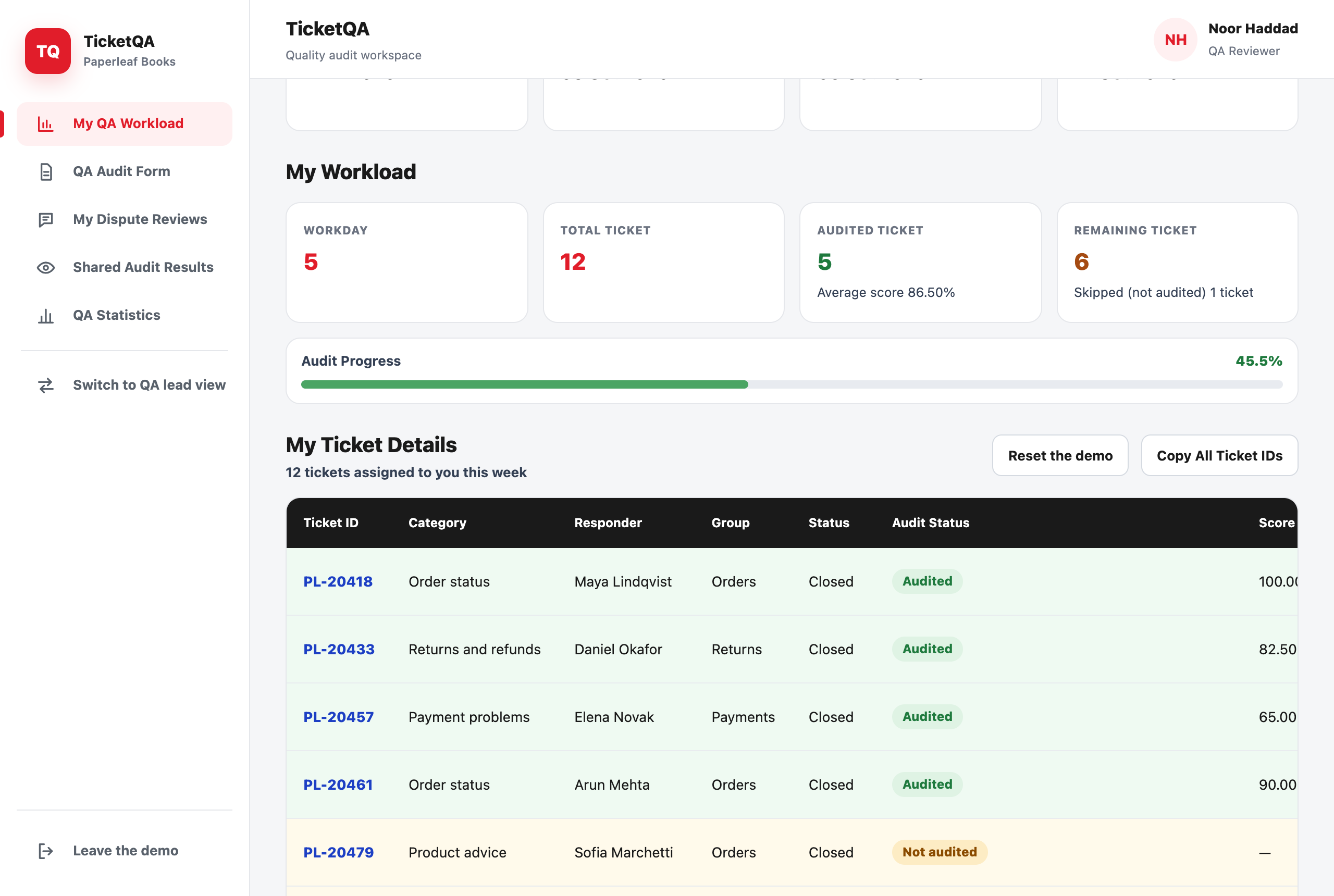
- Work through the list. Each reviewer sees their own tickets, the week's progress and the saved results, and can skip a ticket that cannot be audited, with a reason.
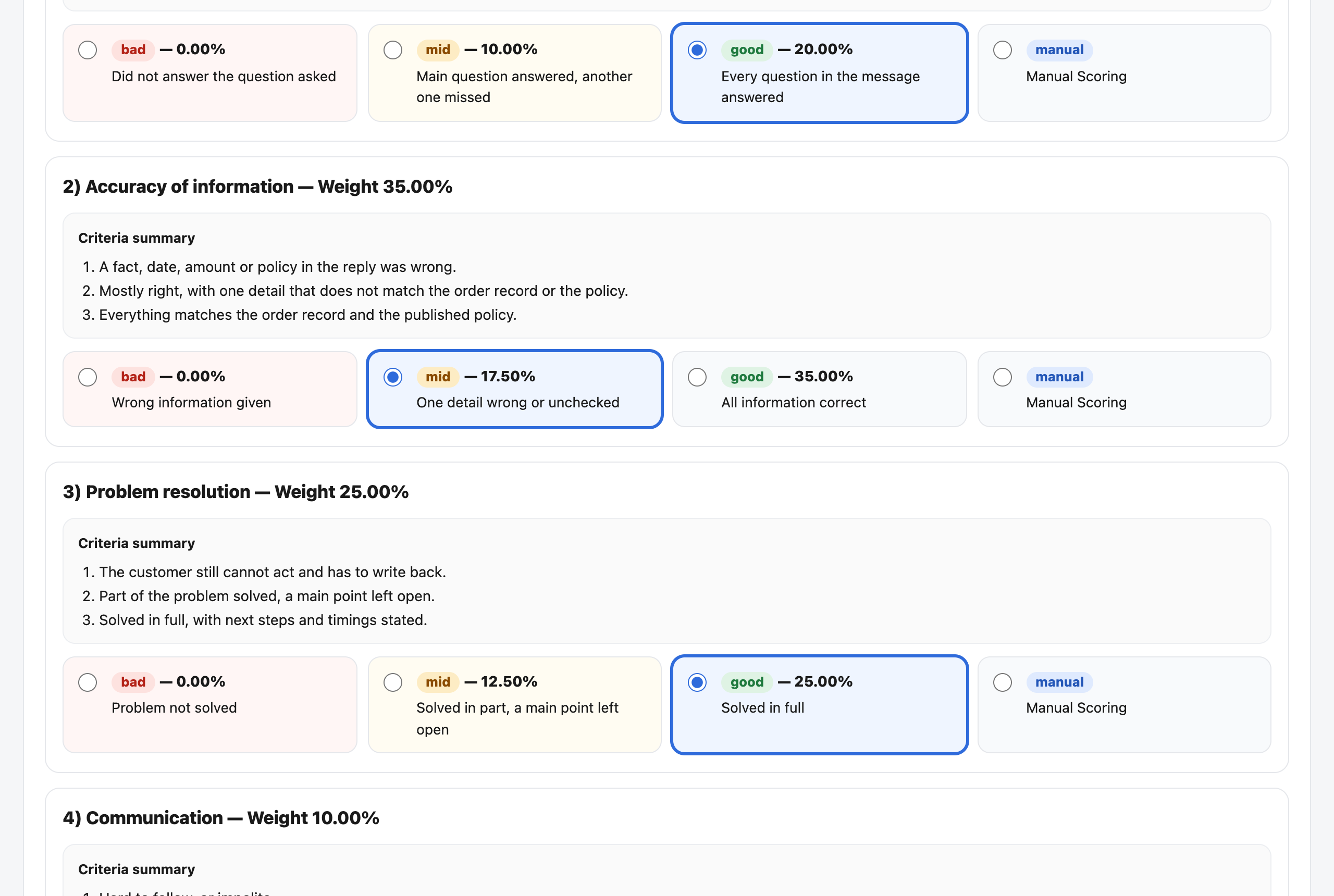
- Audit. The form scores weighted sections, keeps a running total and records root causes, chosen in three steps, for anything that went wrong.
- Send results. One summary per agent, sent only when every assigned ticket is audited, with a deadline to respond.
- The result email. The average, a table by category and one card per ticket, with the buttons to acknowledge or to dispute.
- Acknowledge or dispute. The agent answers from the email, without signing in. Silence past the deadline counts as acknowledged.
- Resolve disputes. The reviewer who did the audit re-opens it, keeps or changes the score, and replies. That reply is final.
- Report. Scores, error figures and dispute outcomes per week, reviewer, agent and category, from the same records the emails used.
Design decisions
Sending a result twice must not restart the clock
The first version treated every send as a new result. Re-sending an email to an agent who had mislaid it quietly opened a new round with a new deadline, and an agent who had already accepted a result could dispute it again. I changed the rule: one delivered result opens one round; any later send is a copy that shows the original status and deadline and offers only the actions that round still allows.
One source for every number
A score appears in the email, on the tracking page, in the statistics and in the reporting dashboard. Each of those reads the same saved audit record, and I wrote checks that compare the stores against each other so a mismatch is found by the system, not by a manager.
Slow servers and impatient clicks
On the platform I used, a save can take many seconds. People click again. Every action that writes is safe to repeat: a second click finds the first one's work and returns the same answer instead of creating a duplicate, and the screen tells the user what was confirmed and what is still unknown.
Say what the agent did, and what can still be done
The tracking screen states two facts for each result in plain words: how the agent responded, and which action is still open to the manager. Earlier wording made managers guess.
Testing
- Automated tests. More than 230 test files. A rule that was wrong in use gets a test for the case that exposed it.
- Acceptance checklist. Written test cases for the manager, reviewer and agent journeys, for concurrent use and for handover, each with the exact steps and the expected result.
- The demo is tested the same way. Its rules live in one shared file with their own tests, and every screen is driven in a real browser at desktop, tablet and phone widths before a change is kept.
What I would do differently
The platform kept the project simple to host but made some actions slow. If I started again I would measure response times from the first week and choose where each piece of data lives with speed in mind, not only convenience.